



Blog: R6D55: #100DaysOfCode (More Posts)
I started out with a template for single.php that needed building up. And I knew it wouldn’t be difficult to do but I had trouble visualising what I wanted to end up with. I’d done wireframes before in Balsamiq for the main page but at that point, I hadn’t fleshed out the idea of having a separate single.php template for each portfolio piece. So that was the first thing I did today… created a wireframe from which I would build out the single.php template.
Once that was done I built it out in my localhost including the styling, bit by bit, piece by piece.
And this is what I ended up with.
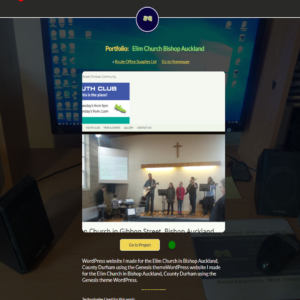
A single post example template for a portfolio piece
Along the way, I added a new custom field to the project for each of the 3 custom post types that indicate whether the project link type is a standard URL or otherwise a link to a GitHub Repository. I wrote some code, similar to the condition statement I talked about in yesterday’s blog, that changes the link text, depending on what is selected in the new custom post type.
So if the link is supposed to be a GitHub repository the code will display the appropriate link text; selectable via a select box when making a new post of a certain post type.
After that, I got into front end testing for the project details that appear on image hover.
It took a little bit of experimentation, and what I ended up with was not perfect in terms of how it shows up on various screen sizes, but not many if any of the images are going to get all the possible content added. When testing I stretched the content and the available space to the absolute limit. In practice. some may not have the full 220 characters. Not all are going to have the technology tags added. So I feel like I’ve done all I can to make that work.
Finally, to finish off the day I started the process of getting the installation online. This is where I’ll add the rest of the content that will comprise the portfolio. As it stands there’s a database connection error, despite that I’ve created the behind the scenes database and added the credentials behind the scenes. It shouldn’t take too long to work that out tomorrow when I have a fresh mind and pair of eyes.
I put the installation in a whole new subdomain called “portfolio“. I did this because I found myself asking the question “Do I want a separate subdomain for the portfolio where the actual WordPress site will live?”
And after a bit of thought, I found that the overwhelming answer, was “yes“. Yes because it is good to have that separation between the site and the library of projects I have set up on the projects domain, and yes because a WordPress installation really does need to be in its own space. And then I can leave the projects in their own portfolio.
So…. my collection of subdomains has expanded. A selection of my other subdomain is as follows
- blog.jonniegrieve.co.uk
- projects.jonniegrieve.co.uk
- wordpress.jonniegrieve.co.uk
- android.jonniegrieve.co.uk
- dyspraxia.jonniegrieve.co.uk
Tomorrow, I will hopefully have something to unveil!