



Blog: Integrating SQLAlchemy with Flask – #1 (More Posts)
In a new series of blogs related to SQLAlchemy, I’m moving away from the command line environment and moving on to exploring how Python, Flask, and SQLAlchemy can work together to make a website driven by external data.
As you can see from the image attributed to this post it will be a simple database of 2 fields and multiple records to begin with, just to keep the scenario simple. The website will contain at least 3 routes and one database.
When I’m setting up a Flask application, it’s always a headache of mine to know what the commands are that I’ll need to use in order to download the files I need and make sure I’m set up correctly.
So I’m going to try and walk you through it before getting started with coding.
Setup.
I’ve set up a few of these Flask projects now and every time I seem to be set up before I even realise it, because of warning messages I see all the time in response to my commands. What seems to work for me is doing my setup in a Python Virtual Environment
The Flask documentation should have you covered on how to set up Flask on the system you’re using. As of this date though I use Windows 10 and GIT Bash to do my command line development.
Through all of this, it only takes a command-line set up with the latest version of python in your CLI or Terminal and the following commands.
First things first we will have to create a Python virtual environment or a venv [vee-enn-vee]. A “venv” is kind of like a separate place on your system for downloading and using python packages without the risk of breaking changes on your system
You can create a virtual environment with the following command.
python - venv env - # Create a virtual environmentWhen that’s done you can activate it (on Windows) with
source .\env\Scripts\activateNext use the PIP package manager to install Flask to your system
pip install flaskYour project will need a requirements.txt file which will make it easier to manage your project if you have to move it to another system. the “pip freeze” command will generate a list of packages installed and their version numbers
requirements file - pip freeze > requirements.txtOnce you’ve done this but you’re still not sure if you have Flask properly installed you can check using flask –version. If you see something like Flask 2.0.0. returned you should be good to go.
Let’s set up a website.
First things first, let’s set up a local development server. We typically do this in an app.py file in the root directory.
# give python access to Flask
from flask import Flask


# assign a new instance of a Flask application to a variable
app = Flask(__name__)
Each application will need at least one route, so the application knows it’ll have something to request from your server. Each route is preceded by a Python decorator and is contained in a function that either returns a string or an HTML template file. Each decorator takes a string that acts as a URL that you can use to load each page.
@app.route('/')
def index():

return render_template("index.html")
in order to return a Template, we need to import it, which we can do at the top of the file.
from flask import Flask, render_template.Render templates are stored in a directory called Templates. In this you can store a simple HTML file with all the elements you would expect from a standard HTML document. Each template can be assigned to an individual Flask route.
Finally, to build the local server, we can use Python’s “dunder” main method. Here we can pass in the localhost URL, a port number, and the debug flag which allows us to fix any errors in development.
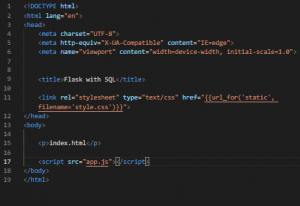
And this, on its own is enough to build a functioning web page that loads in the Browser with Flask. But it’s not up to much of anything yet.
What we have right now is a Flask web page, a place to develop web pages, and an app with 1 route. Flask can do a lot more. I’m going to get into how SQLAlchemy integrates with Flask in a later post, but for now, I just wanted to demonstrate how to set up and get going with building a website with the Python Flask framework.