



Blog: A bit of fun with ChatGPT (More Posts)
I’ve been itching for quite some time to try out ChatGPT. I’ve tried a few times to get in kept being locked out because of site traffic). Today, I had an itch. I scratched it and I finally got in.
What is ChatGPT though? What am I getting into?
I like to think of it as the next generation in Web Search. Something a bit more advanced than putting some search terms into a Google or the like. But even that in itself is a simplistic way of putting it. It’s what’s known as an LLM,(a large language model) that is designed to give you get answers to questions in a human-readable, even conversational way. I’ve used it to get answers to questions like “what is the exposure triangle in Photography” to “can you write me some HTML code?”.
That’s what I say.
A recent article on ZDNET says “ChatGPT is a natural language processing tool driven by AI technology that allows you to have human-like conversations and much more with the chatbot. The language model can answer questions and assist you with tasks like composing emails, essays, and code.”
https://www.zdnet.com/article/what-is-chatgpt-and-why-does-it-matter-heres-everything-you-need-to-know/
The Wikipedia entry says “ChatGPT (Chat Generative Pre-trained Transformer) is an artificial intelligence chatbot developed by OpenAI and launched in November 2022. It is built on top of OpenAI’s GPT-3.5 and GPT-4 families of large language models (LLMs) and has been fine-tuned (an approach to transfer learning) using both supervised and reinforcement learning techniques.”
https://en.wikipedia.org/wiki/ChatGPT
What this means is ChatGPT is only going to get better and more responsible.
There’s a whole other topic about what the implications of ChatPTD are. But I’m not here for that. I wanted to write a quick Demonstration of what ChatGPT can do for code.
Example 1
I’ve asked ChatGPT a couple of queries. For a first go, I asked it to write a simple HTML document. Here’s what I wrote verbatim.
“write me some html code that has a button, an image and a couple of paragraphs all center aligned”
Which admittedly isn’t the most clearly written query. I’ve asked for some code in HTML that has a few HTML elements and asked for those elements to be aligned centrally in the browser. How did it tackle this?
Well, after about 10 or 15 seconds it comes back with the following code.
<!DOCTYPE html>
<html>
<head>
<title>Center-aligned content</title>
<style>
    body {
        text-align: center;
    }
</style>
</head>
<body>
    <h1>Center-aligned content</h1>
    <img src="example-image.jpg" alt="Example image">
    <p>Lorem ipsum dolor sit amet, consectetur adipiscing elit. Integer varius
sagittis consequat. Vestibulum malesuada volutpat leo, vitae tincidunt orci
viverra at. Donec vitae orci non mi ullamcorper faucibus.</p>
<p>Sed auctor nulla lorem, non hendrerit lacus scelerisque vitae. Donec
convallis eget turpis nec commodo. Fusce ac elit vel augue convallis rhoncus vel
eu odio.</p>
    <button type="button">Click me!</button>
</body>
</html>
That is a perfectly valid snippet of HTML.
It gives us an HTML5 document with a style tag where the generated CSS is placed. It’s interesting that it used my instruction to center align the text by putting “center-aligned” as the text content for the level 1 heading. But it obviously scraped some lorem ipsum and put it in paragraph tags.
I like that it says “click me” for the button text.
Below, ChatGPT explains the code and the logic behind it.
In this example, the body element is styled with text-align: center to center-align all of the content within it, including the heading, image, paragraphs, and button. The img element is used to display an example image (you’ll need to replace the src attribute with the URL or file path of your own image), and the button element is used to create a clickable button.
Feel free to customize this code to suit your needs!”
I don’t know how much more powerful this AI can get. By how much more in complexity can ChatGPT reproduce code on request? I’m almost scared to try it.

But I’m going to try anyway. Let’s run through a couple more examples.
Example 2
I asked ChatGPT to write me some more code, to give me a HTML document skeleton that comes with jQuery bundled in.
write me the code for and the latest jquery development file
and another script file that contains a valid jquery function
And considering I mangled my input (“for and”) I was impressed with what was returned. I really wasn’t sure what I was going to get.
“Sure,” said ChatGPT, “here’s an example of how you can include the latest jQuery development file and a custom script file that contains a valid jQuery function in your HTML document:”
<!DOCTYPE html>
<html>
<head>
<title>jQuery Example</title>
<script src="https://code.jquery.com/jquery-git.js"></script>
<script src="myscript.js"></script>
</head>
<body>
    <h1>jQuery Example</h1>
    <p>Click the button to change the text color.</p>
    <button id="myButton">Click me!</button>
</body>
</html>
And there it is. The only real difference I would make here is to put the reference to the jQuery Content Delivery Network (CDN) before the closing body tag. But as far as working code goes it is sound. It has manufactured a simple jQuery example where you get to change the colour of 1 paragraph of text with the click of a button.
ChatGPT also laid out a couple of paragraphs of text to spell out the script files needs needed, and what is in those files. Here’s the code it wrote for the jQuery itself.
/* myscript.js */
$(document).ready(function() {
    $("#myButton").click(function() {
    $("p").css("color", "red");
  });
});
So not only does ChatGPT write the code you need for you, it will give you a clear explanation of the code as well as the instructions you need to move the project to your own environment.
Here’s the text returned by the AI
“In this example, the head section of the HTML document includes two script tags that load the latest jQuery development file and a custom script file named myscript.js.
jquery-git.js is a link to the latest jQuery development file hosted on the jQuery CDN (content delivery network). This ensures that you always have access to the latest version of jQuery.
myscript.js is a custom script file that contains a valid jQuery function. Here’s an example of what this file could look like:
This script uses the jQuery $ function to wait for the document to be ready, and then attaches a click event listener to the button with the myButton ID. When the button is clicked, the script uses the jQuery css method to change the color of all p elements on the page to red.
Note: It’s important to include the jQuery development file before your custom script file to ensure that jQuery is loaded and available for your code to use.”
Example 3
A lot of my projects use an image slider which requires a CSS and JavaScript framework. For my final test, I wanted to see if ChatGPT would know what I meant by the words “skeleton”, “slick slider” and “Carousel” in the context of web development.
This is exactly what I typed into ChatGPT – “I need a HTML project skeleton that includes a link to the Slick sllider carousel, along with the jQuery. Can you also provide me with a html document with a header, footer and a container div element that has a class of container?”
And to my amazement. It did it. It recognised what I meant my slick slider carousel. It generated the link to the content delivery network (or one of them) that served it. And it wrote the jQuery required for one instance of a Slick Carousel object. ChatGPT wrote the code for all of this before my very eyes, before my very eyes. (Note it even saw passed my spelling mistake of the word Slider).
“Certainly”. It said. How very polite and obliging! 😀 But seriously, I was very impressed that it was able to do that.
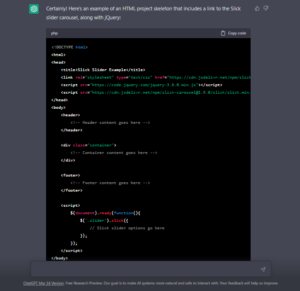
So… in summary, what was returned was a clean set of HTML markup with 3 elements in the document root. A header element, a footer element, and a separate div tag that has a class of container. This is just what I asked for.
<body>
<header>
    <!-- Header content goes here -->
</header>

<div class="container">
    <!-- Container content goes here -->
</div>

<footer>
    <!-- Footer content goes here -->
</footer>

<script>
    $(document).ready(function(){
        $('.slider').slick({
            // Slick slider options go here
        });
    });
</script>
And the AI is intelligent enough to give you advice that it should not be treated as a final code solution, but something you should take to your own text editor and customise to your own needs. And that’s before you even start building proper content. Using CDN is obviously the optimal way to go to generate this kind of code because it won’t (yet) download files to your computer. But it is still pretty astonishing stuff.
Conclusion
There will always need to be a human in charge to oversee the final code. Just as you need a human being to be able to take over the wheel of an autonomous car at any moment. But the rise of ChatGPT is, I think a very exciting development that will revolutionise how we as developers do the research we need to build our projects.